Exploring The Modern Platform Engineering Roadmap To Improve Everyday Developer Workflow Efficiency
Introduction
Learning software skills can feel hard for beginners. A DevOps roadmap helps you learn step by step. DevOps means software developers and operations teams work together as one team. They build, test, and run software quickly and safely. Beginners often feel lost because tech has too many tools. You do not need to learn every tool at once. A good path shows you the right order to learn things. First, you build a strong base with simple computer skills. Next, you learn how to automate tasks with code. Automation means you make computers do boring work without humans. Then, you learn how to deploy and watch apps run smoothly. Deploy means putting your code onto servers for people to use. This guide shows you the exact steps for your journey. You will learn skills that lead to great tech jobs.
What Is a DevOps Roadmap?
A roadmap is a clear learning guide for students and engineers. In simple words, it gives you a planned order of skills. Many beginners make a big mistake when they start. They try to learn fancy tools without knowing the basics. That makes learning hard and confusing. A true DevOps roadmap keeps your focus on core skills. Tools will change every few years in tech companies. Core skills stay useful for your entire career. When you know how systems talk to each other, tools become easy. You can pick up any new software in a few days. So, focus on how things work first.
A Simple DevOps Learning Path
You should learn skills from basic to advanced levels. First, start with Linux. Linux is a computer operating system that runs most web servers. Next, learn Git. Git is a tool that tracks changes in your code files. Then, study computer networking. Networking teaches you how computers talk over the web. After that, move to cloud computing. Cloud computing means renting computers over the internet instead of buying physical hardware. Next, learn Docker. Docker wraps software in clean packages called containers. Containers keep software running the same way everywhere. After containers, you set up CI/CD pipelines. CI/CD pipelines automatically test and ship new code. Then, learn Kubernetes to manage groups of containers. Next, use code to set up servers. Finally, add monitoring tools and security steps to protect your apps.
| Learning Stage | Main Skills | Simple Goal |
| Stage 1: Foundations | Linux, Git, Basic Networking | Learn how servers work and save code history. |
| Stage 2: Packaging & Cloud | Docker, Cloud Basics | Package apps in containers and run them online. |
| Stage 3: Automation | CI/CD Pipelines, Scripting | Test and deploy code automatically without hand work. |
| Stage 4: Orchestration & IaC | Kubernetes, Terraform | Manage many containers and build servers using code. |
| Stage 5: Reliability & Security | Monitoring, Logs, Security | Keep software running fast, fix errors, and block hackers. |
DevOps Engineer Roadmap
A DevOps engineer needs practical skills to build real projects. First, practice typing commands in a Linux terminal every day. Next, save your practice files to a Git repository. Then, write small Python or Bash scripts to automate simple tasks. Next, package a basic web application into a Docker container. Deploy that container to a free cloud server. After that, connect your Git code to a CI/CD pipeline. Every time you push new code, the pipeline builds your app. Then, set up Kubernetes to restart your app if it crashes. Also, write code that creates your cloud servers automatically. Finally, add alerts that message you when your website goes down.
Let us look at a simple project example. Imagine you build a basic school note-taking website. First, you write the code and save it with Git. Next, you pack the website into a Docker container. Then, your pipeline tests the code and deploys it to a cloud server. If many students visit at once, Kubernetes starts extra copies of the site. Monitoring tools watch the servers and track memory usage. If a server stops, your system alerts you right away. This project ties every core skill together into one neat package.
DevOps Tools You Should Understand
You do not need to memorize every product name. It is better to understand tool categories first. Source control tools store your code files and record every edit. Container tools wrap your application files together so they run anywhere. CI/CD tools test and deliver your updates to users automatically. Kubernetes tools run and organize hundreds of containers at the same time. Infrastructure as Code tools build virtual servers from text instructions. Monitoring tools check system health and show helpful performance graphs. Logging tools collect system event messages so you can read them. Cloud platforms let you rent computers, storage, and networks online. Security tools scan your code files and containers for dangerous weaknesses. GitOps tools make Git the single source of truth for your systems.
| Tool Area | Purpose | Example Tools |
| Source Control | Save code and track team edits | Git, GitHub, GitLab |
| Containers | Package applications with their files | Docker, Podman |
| CI/CD Automation | Test and deploy code changes quickly | Jenkins, GitHub Actions, GitLab CI |
| Orchestration | Manage and scale groups of containers | Kubernetes, Docker Swarm |
| Infrastructure as Code | Build cloud hardware using simple text files | Terraform, OpenTofu, Ansible |
| Monitoring & Logs | Watch system health and read error logs | Prometheus, Grafana, ELK Stack |
DevOps Tools Comparison Made Simple
Beginners often ask which tool is the best one. The truth is that no single tool fits every team. You should compare tools by their clear purpose and features. Also, check how hard the tool is to learn. Some tools take only one afternoon to learn. Other tools take months of practice before you feel confident. Next, compare the financial cost of running the software. Also, look at security features, helpful user support, and integrations. Integrations mean two different software tools connect and talk easily. Always look at your team’s current skills before picking software. The most popular tool might be too complex for your team. Pick simple tools that solve your exact daily problems.
DevOps Certifications Roadmap
DevOps certifications can help highlight your knowledge to companies. Beginners should consider exams only after building real projects first. Do not use certifications to replace real hands-on practice. First, choose a certification that matches your current learning goals. Entry cloud exams teach you basic terms and cloud concepts. Advanced exams test your speed with real terminal tasks. Check the exam requirements, costs, and renewal rules carefully before you pay. Most technical certificates expire every two or three years. To prepare well, read the exam guide and take practice tests. Also, build practice labs on your own computer. Certifications prove that you study hard, but hands-on projects win real job offers.
SRE Roadmap
SRE stands for Site Reliability Engineering. SRE engineers make sure websites stay fast, healthy, and never crash. An SRE roadmap starts with the same base as DevOps. You need strong Linux, networking, and cloud skills. Next, you dive deeper into monitoring metrics, logs, and alert rules. SRE engineers create reliability goals called Service Level Objectives. These goals define how much downtime a company allows each month. Next, you learn incident response. Incident response means fixing broken systems quickly during an emergency. You also write automation scripts to fix repeating errors. Finally, you study capacity planning to buy the right amount of server power. DevOps skills give you a perfect starting base for SRE work.
Platform Engineering Roadmap
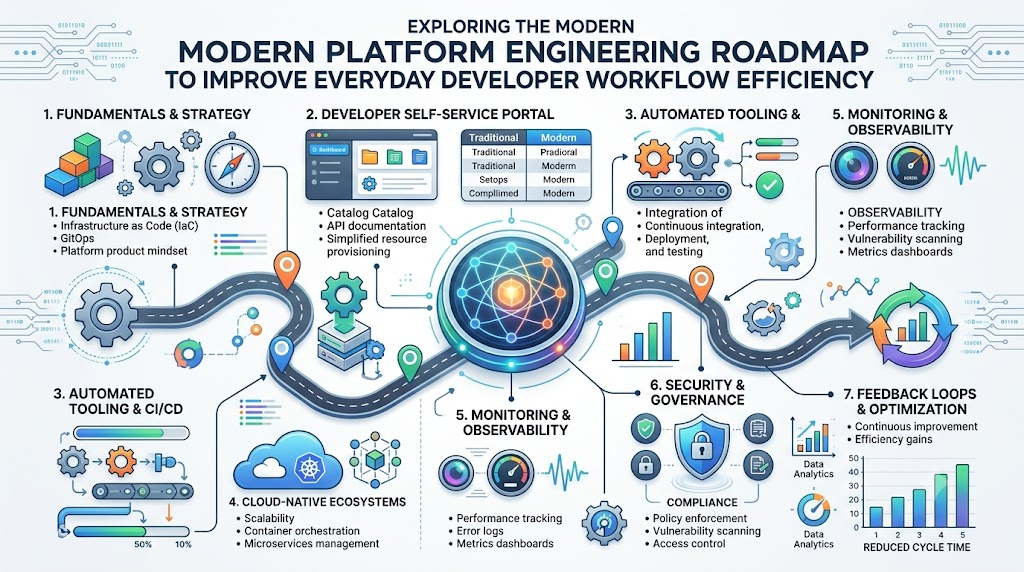
Platform Engineering is another growing path in modern software engineering. Platform engineers build internal tools and portals for other software developers. They take away hard cloud tasks so developers can work faster. A platform engineering roadmap covers cloud, Linux, containers, and Kubernetes. It also includes CI/CD, Infrastructure as Code, and tight security. Most importantly, it focuses on developer experience. Imagine a team where developers need three days to set up one test server. A platform engineer builds an easy internal web portal for them. The developer clicks one button on the portal screen. The platform creates the server, network, and database in two minutes. The developer stays happy, and the company moves much faster.
Real-Life Scenarios and Experiences
Here are realistic scenarios that show how engineers solve everyday problems:
- Scenario 1: The Broken Website Deploy
- Problem: A developer copied files to a live server by hand and broke the website.
- Learning Step: The team realized that manual updates cause human mistakes.
- Tool Use: They set up a GitHub Actions pipeline to test and deploy code automatically.
- Result: The system caught errors before reaching live users, stopping website crashes.
- Lesson: Automation removes human mistakes and makes deployments safe.
- Scenario 2: The Crashing Server
- Problem: A retail website crashed every time thousands of shoppers arrived at noon.
- Learning Step: The team needed a way to add more servers quickly during traffic spikes.
- Tool Use: They placed their web application inside Kubernetes pods with automatic scaling rules.
- Result: Kubernetes launched extra copies of the app during busy hours and shut them down later.
- Lesson: Container tools handle sudden traffic growth without needing someone to watch the screen.
- Scenario 3: The Slow Development Team
- Problem: New developers spent two weeks setting up their laptops before writing any code.
- Learning Step: The company needed a clean, repeatable way to share development environments.
- Tool Use: The platform team built Docker compose templates and container images for the staff.
- Result: New engineers started coding on their very first day with one simple setup command.
- Lesson: Good internal platforms save engineering time and boost daily productivity.
Common Mistakes to Avoid When Choosing Delhi Events
Event organizers and visitors in Delhi often make simple planning mistakes. Here are key mistakes to avoid along with simple solutions:
- Picking Venues Far From Metro Stations: Delhi traffic can cause long travel delays for visitors. Pick venues within a short walk of an active Delhi Metro station.
- Ignoring Extreme Summer Heat: Outdoor events in peak summer make attendees tired and sick. Choose air-conditioned indoor halls or schedule events during pleasant winter months.
- Failing to Check Parking Space: Popular venues in Central and South Delhi run out of parking fast. Confirm dedicated parking lots or hire valet teams before booking the space.
- Missing Municipal Clearances: Running public events without local police and civic permission leads to sudden shutdowns. Apply for all city licenses and fire safety permits weeks in advance.
- Forgetting Power Backups: Sudden power cuts during events can ruin sound systems and stage presentations. Book heavy-duty silent diesel generators as an immediate power backup.
- Overlooking Food Safety Standards: Low-quality food vendors can cause stomach sickness among guests. Hire certified caterers who follow clear food hygiene rules.
- Booking Without Sound Permits: Loud outdoor speakers after ten at night violate local Delhi noise rules. Keep speakers inside soundproof halls or end loud music before night deadlines.
- Skipping Water Refill Stations: Guests get dehydrated quickly during long conference days and exhibitions. Place clean, filtered water dispensers in every major room and hallway.
How DevOpsSchool Fits Into Your Learning Plan
Finding the right study materials can take a lot of time. DevOpsSchool helps students organize their study path without extra stress. The platform provides structured ninety-day learning plans across many engineering subjects. You can explore structured guides for DevOps, SRE, and Platform Engineering. You can also study GitOps, DevSecOps, and CloudOps. If you want to check different software, use their large technology directory. This directory helps you research and compare tools across CI/CD, Kubernetes, and cloud security. DevOpsSchool also shares certification resources, a certification registry, and hands-on labs. You can read tutorials, browse a simple tech glossary, and review career resources. These tools support your personal study goals every step of the way.
DevOps Jobs and Career Growth
Learning modern software skills opens doors to many exciting career paths. A DevOps Engineer helps developers ship code smoothly using automation tools. A Site Reliability Engineer keeps large systems fast, healthy, and available. A Cloud Engineer designs and manages computer systems inside cloud providers. A Platform Engineer builds friendly internal self-service tools for internal developers. A DevSecOps Engineer adds automated security checks into the software pipeline. You can prepare for these roles by building complete hands-on projects. Practice fixing broken systems when errors appear in your terminal. Write clear notes about your projects to share during job interviews. Real problem-solving skills impress hiring managers faster than simple resume buzzwords.
Frequently Asked Questions
1. What is the best skill to learn first in DevOps?
You should learn Linux first. Most servers and cloud systems run on Linux operating systems. When you know basic terminal commands, you can manage files and change settings easily. Linux knowledge also makes Docker and cloud tools much simpler to understand. Spend time practicing daily terminal commands before you touch complex tools.
2. Do I need to learn coding to work in DevOps?
Yes, you need basic coding and scripting skills. You do not need to build complex software like a full-time programmer. But you must write short scripts using Python, Bash, or YAML. These scripts automate routine server tasks and configure pipelines. Basic coding helps you understand developer workflows and fix small delivery errors.
3. How long does it take to learn DevOps from scratch?
It usually takes six to nine months of steady practice. If you study for two hours every day, you can master the foundations in three months. Next, spend three months on containers, CI/CD, and cloud basics. Use your final three months to build real projects and prepare for job interviews.
4. Can a beginner get a DevOps job without experience?
Yes, beginners can land junior roles by showing real proof of skills. Build two or three complete projects on your own computer. Put all your project code and configuration files on GitHub. Write clear documentation showing how you solved problems. Practical work proves your skill to hiring managers better than simple promises.
5. What is the difference between DevOps and SRE?
DevOps focuses on breaking team silos and speeding up code delivery. SRE focuses on keeping systems stable, fast, and reliable after deployment. DevOps engineers build automation pipelines and deployment tools. SRE engineers watch site metrics, fix sudden crashes, and manage system capacity. Both roles share the same basic technical foundation.
6. Which cloud provider should I learn first?
Start with any major cloud provider like AWS, Microsoft Azure, or Google Cloud. Most cloud providers use the same basic concepts for servers, storage, and networking. Once you understand how one provider works, learning another provider takes only a few weeks. Pick the provider most popular with tech employers in your local area.
7. Are certifications required to get a job in DevOps?
No, certifications are not strictly required, but they help you get noticed. A good certification shows hiring managers that you studied recognized standards. However, passing an exam without practical skill will not keep you in a job. Always combine your certification study with real hands-on projects in your home lab.
8. What is the role of Docker in DevOps?
Docker packages your application code and software libraries into one neat container. This container runs the same way on a laptop, test server, or cloud machine. It stops the common problem where code works on a developer machine but breaks on production servers. Containers make testing and shipping software simple.
9. Why is Kubernetes so popular in modern engineering?
Kubernetes manages hundreds of containers across many computers at the same time. If a container crashes, Kubernetes starts a fresh copy right away. It also balances web traffic and scales systems up or down during busy hours. Companies use Kubernetes because it keeps large web applications online without manual intervention.
10. What is Infrastructure as Code?
Infrastructure as Code means setting up computers and networks using text files. In the past, engineers clicked buttons on websites to make servers. With code, you write your server requirements in simple configuration files. Tools read the files and build the systems automatically. This makes your infrastructure easy to track and copy.
11. How much math do I need for DevOps?
You need very little math for everyday DevOps work. Basic arithmetic helps you calculate server costs, disk sizes, and network bandwidth. But you do not need advanced calculus or complex algebra. DevOps focuses mainly on logical thinking, system connections, automation steps, and solving practical computer errors.
12. How do I practice DevOps tools for free?
You can practice almost every DevOps tool on your own personal computer. Linux, Git, Docker, and many Kubernetes tools are free and open source. Most major cloud platforms also offer free tiers for your first year. You can build complete pipelines and run test servers without spending money.
Conclusion
Starting your software journey feels easy when you follow a clear path. Always start with the basics like Linux, Git, and simple networks. Learn one skill at a time so you never feel overwhelmed. Practice every new concept through small, real projects on your computer. Do not chase every new tool that appears online. Instead, build strong core knowledge that stays useful for years. Use certifications as supporting evidence for your hard work and study habits. Later on, explore advanced areas like Site Reliability Engineering and Platform Engineering. Keep learning through real problems, build things every week, and you will grow your engineering career step by step.
Leave a Reply